Best AI Tools for Social Media Content
Best AI Tools for Social Media Content
Introduction
You need a fresh idea, an attractive visual, a strong caption, a good hook, a short video, subtitles, hashtags, and sometimes a complete content calendar. Doing everything manually can take hours, especially when you’re managing a business page, YouTube channel, Instagram account, TikTok profile, or several platforms at the same time. This is where artificial intelligence has changed the game. The best AI tools for social media content can help you brainstorm ideas, write captions, create images, edit videos, repurpose old content, and organize your publishing workflow. Instead of spending all your time on repetitive tasks, you can use AI to handle the first draft while you focus on creativity, strategy, and your audience. But there is an important point to understand: AI should not make your content completely for you. The strongest social media content combines AI speed with human creativity, experience, opinions, and personality. In this guide, we’ll look at some of the best AI tools for social media content, what they can do, who they are useful for, and how you can build a practical AI-powered social media workflow.
Why AI Is Becoming Essential for Social Media Content
Social media platforms are constantly demanding new content.
A creator may need to publish several times a week, while a business may need content almost every day. Coming up with new ideas repeatedly can become exhausting.
AI can help reduce that pressure.
For example, you can use AI to:
- Generate content ideas
- Write social media captions
- Create video scripts
- Improve headlines and hooks
- Generate visual concepts
- Edit short-form videos
- Repurpose existing content
- Create content calendars
- Rewrite content for different platforms
- Improve the overall content workflow
This doesn’t mean you should publish everything AI generates.
Instead, think of AI as a creative assistant. It helps you get from a blank page to a useful first draft much faster.
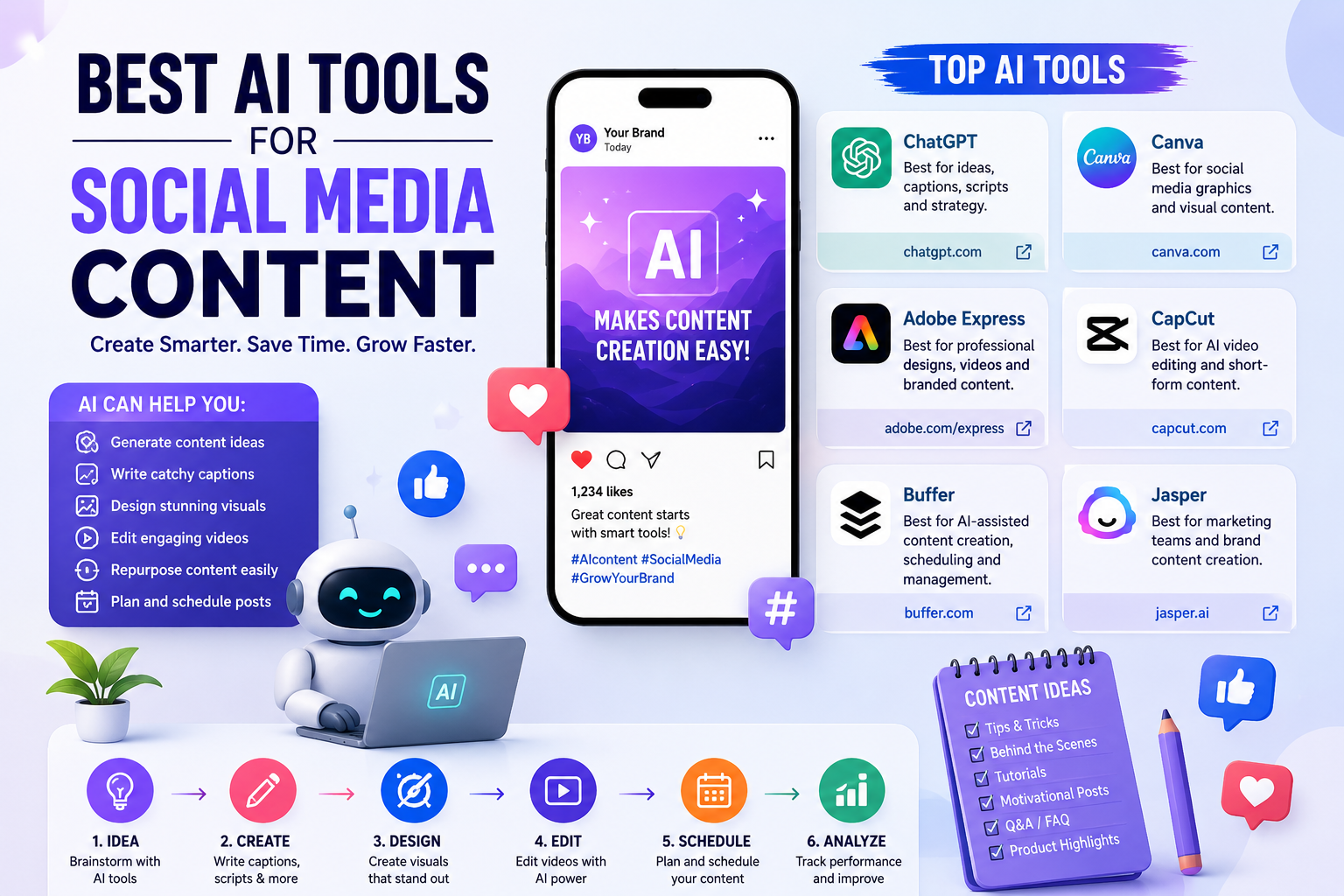
1. ChatGPT: Best for Ideas, Captions, Scripts, and Strategy
If you’re looking for one flexible AI tool for social media content, ChatGPT is a strong starting point.
It can help with brainstorming, writing, rewriting, content planning, audience research, hooks, scripts, and adapting one idea into different formats. OpenAI’s marketing guidance specifically highlights campaign brainstorming, content creation, messaging, content calendars, and adapting content across channels as useful marketing applications. (OpenAI)
For example, instead of asking:
“Write an Instagram post about fitness.”
You can give it more useful instructions:
“Create five Instagram post ideas for beginners who want to lose weight through simple home workouts. Use a friendly tone and give every post a strong opening hook.”
The second prompt gives AI more context, so the result is usually more useful.
You can use ChatGPT for:
- Instagram captions
- Facebook posts
- LinkedIn posts
- TikTok scripts
- YouTube Shorts ideas
- Content calendars
- Video hooks
- Story ideas
- Product descriptions
- Promotional content
The key is to treat the output as a draft that you review and improve, rather than automatically publishing it. OpenAI also recommends applying human judgment and reviewing AI-generated work for accuracy and nuance. (OpenAI)
2. Canva: Best for Social Media Graphics and Visual Content
Social media is highly visual, and Canva has become a popular choice for creators and businesses that need attractive graphics without being professional designers.
Canva provides templates and AI-powered features through its Magic Studio. Its tools can help with social media designs, images, videos, animations, and other marketing materials. (Canva)
You can use Canva to create:
- Instagram posts
- Instagram Stories
- Facebook graphics
- YouTube thumbnails
- Pinterest pins
- TikTok videos
- Promotional banners
- Quote graphics
- Business advertisements
One major advantage is simplicity. You don’t need years of graphic design experience to create something professional-looking.
You can start with a template, change the text, add your branding, replace images, and customize the design.
For social media creators who want to produce visual content quickly, Canva can save a considerable amount of time.
3. Adobe Express: Best for Professional-Looking Social Content
Adobe Express is another useful option for creating social media graphics, videos, flyers, and promotional content.
Adobe provides AI-powered features alongside templates and editing tools, making it possible for users without advanced design experience to create marketing visuals. (OpenAI)
Adobe Express can be useful for:
- Social media posts
- Promotional graphics
- Short videos
- Business advertisements
- Posters
- Branded content
- Marketing materials
One particularly useful feature for businesses is maintaining visual consistency.
If your business uses specific colors, fonts, and messaging, consistent branding can make your social media pages look more professional.
Adobe Express can therefore be a good option for small businesses that want better-looking content without hiring a designer for every single post.
4. CapCut: Best for AI Video and Short-Form Content
If your social media strategy focuses heavily on video, CapCut deserves attention.
Short-form video has become a major part of platforms such as TikTok, Instagram, and YouTube. But editing every video manually can take a lot of time.
CapCut offers AI-powered video editing features that can help with scripts, captions, text-to-speech, video generation, background removal, and other editing tasks. Its official tools also support workflows for creating social media videos and turning longer content into shorter clips. (CapCut)
You can use CapCut for:
- TikTok videos
- Instagram Reels
- YouTube Shorts
- Video captions
- AI-generated videos
- Text-to-speech
- Video resizing
- Short-form video editing
- Long-video-to-short workflows
For beginners, one of the biggest advantages is that you don’t need advanced video-editing knowledge to start.
You can upload your footage, use AI-assisted features, add captions and music, make adjustments, and export the finished video.
5. Buffer: Best for AI-Assisted Social Media Management
Creating content is only one part of social media marketing.
You also need to organize, schedule, and publish that content.
Buffer combines social media management with an AI Assistant that can help generate ideas, rewrite content, adjust tone, and adapt posts for different platforms. (Buffer)
For example, you might have a long piece of content and want to turn it into several social media posts.
Instead of starting from zero each time, you can use AI-assisted tools to create different versions for different audiences and platforms.
Buffer can be particularly useful for:
- Social media scheduling
- Content planning
- Caption creation
- Content repurposing
- Managing multiple social accounts
- Creating platform-specific variations
This can make a big difference for someone who manages social media for multiple clients or businesses.
6. Jasper: Best for Marketing Teams and Brand Content
Jasper is designed with marketing and business content in mind.
It can be useful for companies that need consistent marketing communication across multiple social media channels.
A business may have a specific tone of voice. For example, a financial company might want professional language, while a clothing brand may prefer something more casual and energetic.
The challenge is maintaining that voice across hundreds of posts.
Tools designed around marketing workflows can help teams create and adapt content while keeping brand requirements in mind.
Jasper can be particularly useful for:
- Marketing teams
- Agencies
- Businesses
- Social media managers
- Brand content
- Campaign content
- Content repurposing
For individual beginners, a simpler tool may be enough. For larger content operations, specialized marketing AI can become more valuable.
How to Choose the Right AI Tool
You don’t need to subscribe to every AI tool available.
In fact, doing that can become expensive and confusing.
Instead, choose tools according to your biggest problem.
If you struggle with ideas, captions, and scripts, start with ChatGPT.
If you need graphics and visual designs, try Canva.
If you want professional marketing graphics, consider Adobe Express.
If you’re focused on TikTok, Reels, and YouTube Shorts, CapCut can be particularly useful.
If your biggest problem is scheduling and managing social media content, Buffer may be helpful.
If you’re running a larger marketing operation, Jasper may be worth exploring.
The best tool isn’t necessarily the one with the longest feature list.
It’s the one that solves your actual problem.
How to Use AI Without Making Your Content Feel Robotic
This is extremely important.
One of the biggest problems with AI-generated social media content is that it can sometimes sound generic.
You may see phrases that feel overly polished, repetitive, or unnatural.
Your audience doesn’t want to feel like they’re reading a machine-generated advertisement.
The solution is simple:
Use AI for assistance, then add yourself back into the content.
Add your:
- Personal experiences
- Opinions
- Stories
- Humor
- Examples
- Industry knowledge
- Unique perspective
For example, instead of asking AI to write an entire motivational post and publishing it immediately, ask AI for five ideas.
Choose the best one.
Then write the main story yourself and use AI to improve clarity and structure.
This creates a much more natural result.
Create More Content From One Idea
One of the smartest ways to use AI is content repurposing.
You don’t need to create a completely new idea every day.
Imagine you publish a 1,500-word blog article.
That one article could become:
- Five Facebook posts
- Five Instagram captions
- Three LinkedIn posts
- Several short-video ideas
- Ten social media hooks
- A carousel post
- A short email
- Several quote graphics
AI can help you transform the same core idea into different formats.
This saves time and helps you maintain consistency.
Instead of constantly asking:
“What should I post today?”
you can ask:
“How many useful pieces of content can I create from what I’ve already made?”
That is a much more sustainable approach.
Build a Simple AI Social Media Workflow
You don’t need a complicated system.
Try this:
Step 1: Research Your Audience
Understand what your followers want to learn, watch, or discuss.
Step 2: Generate Ideas
Use ChatGPT to brainstorm relevant topics and content angles.
Step 3: Write the Content
Create your first draft and then add your personal voice.
Step 4: Create the Visual
Use Canva or Adobe Express for graphics.
Step 5: Create Videos
Use CapCut when the content is better suited to short-form video.
Step 6: Repurpose
Turn your best ideas into different formats.
Step 7: Schedule
Use a social media management platform such as Buffer if it fits your workflow.
Step 8: Analyze and Improve
Look at which topics, hooks, formats, and posts perform best.
Then create more content based on what your audience actually responds to.
Don’t Let AI Replace Your Creativity
AI can write a caption in seconds.
It can generate ideas quickly.
It can help edit a video.
It can create a design.
But none of those things automatically guarantee that people will care.
Your audience follows you because of your perspective.
They want useful information, entertainment, inspiration, solutions, or a connection with your brand.
That’s why the strongest approach is:
AI for speed + human creativity + audience understanding.
AI can help you produce more, but you still need to decide what is worth producing.
You should also review AI-generated information before publishing it. AI systems can sometimes produce incorrect or misleading information, so important claims should be checked before they reach your audience. (OpenAI)
Final Thoughts
The best AI tools for social media content can completely change the way creators and businesses approach content production.
ChatGPT can help you move from a blank page to ideas, captions, scripts, and content plans. Canva and Adobe Express can help turn those ideas into professional visual content. CapCut can simplify short-form video creation and editing, while Buffer can help organize and manage your social media workflow. Jasper is another option for businesses and marketing teams that need more structured brand-focused content. But don’t make the mistake of thinking that more AI tools automatically mean better content.
You don’t need ten subscriptions.
Start with one or two tools that solve your biggest problems.
Learn how to use them properly.
Create content consistently.
Study what your audience responds to.
Then improve your strategy.
The real advantage of AI isn’t simply that it can create content faster. The real advantage is that it gives you more time to think, experiment, connect with your audience, and create something genuinely valuable.
When you combine AI with your own creativity and experience, you don’t just create more social media content.
For more: click here